Managing 5 courses with sticky notes and mental checklists? There's a better way.
At the start of each semester, thousands of students build the same fragile system: a mix of Canvas notifications, phone reminders, and rough mental notes about what's due when. It works — until week four, when two essays and a problem set land on the same Tuesday.
Google Sheets assignment trackers solve this. But not all templates are built the same. We tested every popular assignment tracker template for Google Sheets we could find — free and paid — to save you the hour of digging.
Here's what we looked for: deadline sorting that actually works, support for multiple courses in one file, some form of grade tracking, and a layout that doesn't fall apart on your phone. Not every template clears that bar. The ones below are the ones worth your time.
What Makes a Good Assignment Tracker Template?
Before getting into the reviews, it helps to know what separates a useful template from a pretty one that collects digital dust after week two.
Must-haves
Deadline sorting. You need to see what's due next without manually scanning every row. A template that doesn't sort by date is just a list with extra steps.
Multi-course support. Most students carry four to six courses. A tracker that handles only one course means you're either maintaining multiple files or ignoring half your workload.
Grade tracking. Knowing your current grade — and what you need on the final to hit your target — changes how you spend your time. This is basic information that most free templates skip entirely.
Mobile-friendly layout. You're checking your assignments on the bus, between lectures, at the library. A template that requires a full desktop screen to read is only half useful.
Nice-to-haves
Automated sorting. Apps Script can sort your task list the moment you add a new assignment. Manual sorting is fine; forgetting to sort and missing a deadline is not.
Grade projections. A "What do I need on my final?" calculator is the kind of feature that earns its keep once a semester and saves serious stress every time.
Semester reset. A clean way to archive last semester's data and start fresh without rebuilding from scratch.
Why Google Sheets specifically?
It's free with any Google account. It works on every device. You can share a single link with a study group or tutor and everyone sees the same file in real time. You don't need to download anything or learn new software. For a homework tracker, that combination is genuinely hard to beat.
5 Best Assignment Tracker Templates Reviewed
Here are the five templates worth your attention, ranked from "decent free option" to "the one that actually does everything."
1. SpreadsheetPoint Free Tracker — Best for Minimalists
Price: Free
Courses supported: 1
The SpreadsheetPoint homework tracker is a clean, no-frills spreadsheet with columns for assignment name, due date, status, and notes. You can download it, rename it, and be entering assignments within five minutes.
For a student managing a single course — or someone who just wants to test whether a spreadsheet system works for them — it does the job.
Pros:
- Completely free, no sign-up required
- Clean layout with no overwhelming features
- Zero setup time
Cons:
- Handles one course only — you'd need separate files for each subject
- No grade calculation of any kind
- No automated sorting or Apps Script
- No dashboard view to see the full picture
Rating: 3/5 — A fair starting point if you're new to spreadsheet tracking, but you'll outgrow it quickly.
2. Spreadsheet Daddy Collection — Best Free Roundup
Price: Free
Courses supported: Varies by template
Spreadsheet Daddy offers a collection of google sheets assignment templates with colour-coded rows and a more visual layout than the typical blank spreadsheet. There are a few variations to choose from, which is useful if you want to pick a style that suits how you think.
The colour coding alone makes it easier to scan at a glance — a real improvement over plain text lists.
Pros:
- Free with multiple template options
- Colour coding makes scanning faster
- Visual layout feels less like data entry
Cons:
- No automation — sorting and updates are manual
- No dashboard or summary view
- No Do Dates (the date you plan to start work, not just when it's due)
- Feature depth is shallow across the collection
Rating: 3.5/5 — Better than a blank sheet, and the visuals help. Still a manual system that won't tell you much about your grades.
3. TopSheets Assignment Tracker — Best Budget Paid
Price: $5.25
Courses supported: Limited
TopSheets sits in the budget paid tier and offers more structure than the free options: four tabs, some customisable fields, and compatibility with both Google Sheets and Excel. For students who want a bit more organisation without spending much, it's a reasonable middle ground.
Pros:
- Cheap entry point for a paid template
- Better formatting than most free options
- Works in both Google Sheets and Excel
Cons:
- No Do Dates — only deadline tracking
- No grade projection calculator
- Limited course capacity
- No automation
Rating: 3.5/5 — Solid for the price, but the feature ceiling is low. You get structure without intelligence.
4. You Are Loved Templates — Best for Visual Learners
Price: $5.95
Courses supported: Multiple
You Are Loved has built a genuine following on TikTok and among students who care about how their workspace looks. The design is noticeably better than most competitors — soft colours, thoughtful layout, the kind of aesthetic that makes you want to open the file.
This matters more than it sounds. A tracker you actually enjoy using gets opened daily. One that feels clinical gets ignored.
Pros:
- Strong visual design — one of the best-looking templates available
- Established brand with a community behind it
- Supports multiple courses
Cons:
- No Apps Script automation — all updates are manual
- Google Sheets and Excel versions sold separately (higher total cost if you need both)
- Limited automation depth compared to what's possible in Sheets
Rating: 4/5 — The best design in this roundup, and design matters for daily-use tools. Falls short on automation and grade intelligence.
5. Assignment Tracker Pro — Best Overall for College Students
Price: $6.99
Courses supported: Unlimited
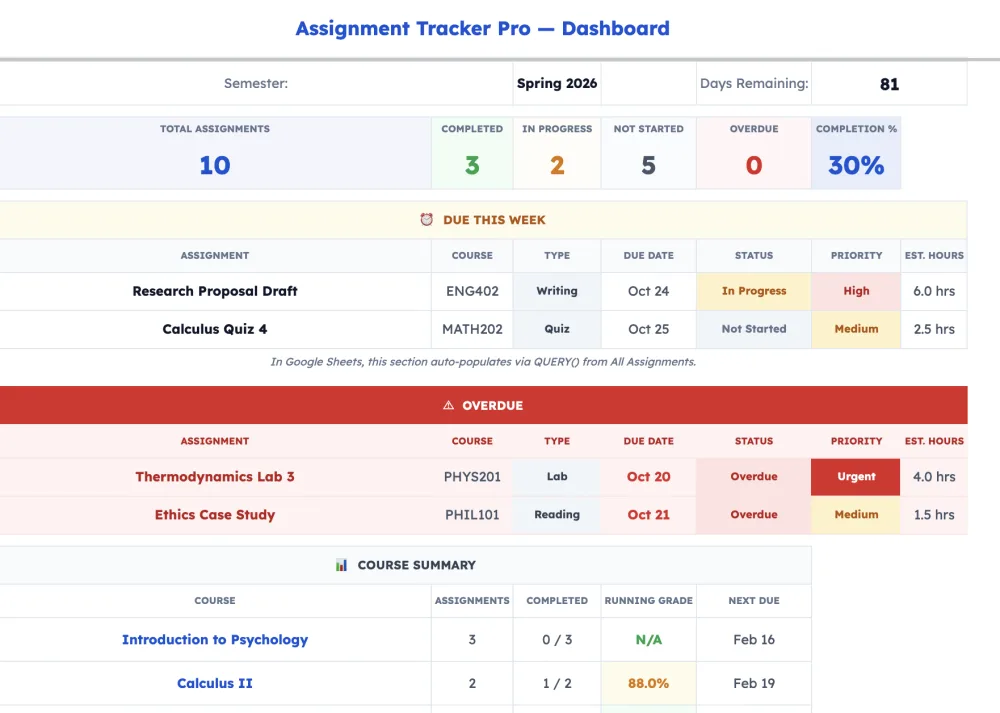
Assignment Tracker Pro is built around one idea: enter your assignment once, see it everywhere you need it. The 8-tab system uses a single master data entry sheet to populate a Dashboard, a course-by-course view, a weekly planner, and a grade calculator — all automatically.
Most templates make you choose between a good calendar view or a good list view. This one links them.
Key features:
Dashboard tab. A live summary of every course — current grade, assignments completed, what's coming up. This is the view you check every morning.
Do Date engine. This is the feature that sets it apart from every other homework tracker template in this roundup. A Do Date is the date you plan to work on an assignment, not just when it's due. The system builds a daily task list based on your Do Dates, so you always know what to work on today rather than just what's overloading next Thursday.
"What Do I Need?" grade calculator. Enter your target grade and the calculator tells you the minimum score you need on remaining assessments to reach it. Useful at the start of the semester for planning. Essential at the end when the stakes are high.
Apps Script automation. The template uses Google Apps Script to handle sorting, date calculations, and view updates automatically. You enter the assignment. The spreadsheet does the organising.

Why it wins the overall category: It's the only assignment tracker template Google Sheets option in this roundup where a single data entry populates linked views across all tabs. Every other template requires manual updates in multiple places. That gap widens fast across a full semester.
Pros:
- 8-tab system with linked views from one data entry point
- Do Date engine for daily task planning
- Grade projection calculator
- Apps Script automation
- Includes both Google Sheets and Excel (.xlsx) versions
- Dashboard gives a full semester view at a glance
Cons:
- $6.99 (though a free Lite version is available)
- More features than some minimalists want
Rating: 5/5 — The most complete best assignment tracker template available. Built for students who are tracking multiple courses and actually want to know where they stand.
Feature Comparison Table
| Feature | SpreadsheetPoint | Spreadsheet Daddy | TopSheets | You Are Loved | Assignment Tracker Pro |
|---|---|---|---|---|---|
| Price | Free | Free | $5.25 | $5.95 | $6.99 |
| Courses supported | 1 | Varies | Limited | Multiple | Unlimited |
| Dashboard view | ✗ | ✗ | ✗ | ✗ | ✓ |
| Grade calculator | ✗ | ✗ | ✗ | ✗ | ✓ |
| Do Dates | ✗ | ✗ | ✗ | ✗ | ✓ |
| Apps Script automation | ✗ | ✗ | ✗ | ✗ | ✓ |
| Mobile-friendly | ✓ | ✓ | ✓ | ✓ | ✓ |
| Excel version included | ✗ | ✗ | Separate | ✗ | ✓ Included |
Assignment Tracker Pro leads on 6 of 8 categories. The two it doesn't lead on are price (four competitors are cheaper or free) and the fact that minimalists may prefer something with fewer tabs. That's a fair trade-off for students managing a real courseload.
If you want a free homework tracker, SpreadsheetPoint or Spreadsheet Daddy are reasonable starting points. If you want something you'll still be using in week twelve, Assignment Tracker Pro is the one.
Our Pick: Assignment Tracker Pro
After testing every template on this list across a full semester's worth of assignments, Assignment Tracker Pro is the clear recommendation for most college students. Here's why it keeps coming back to the top:
- It solves the right problem. Most students don't struggle to record assignments — they struggle to see their whole workload at once and know what to work on today. The Dashboard and Do Date engine address exactly that.
- Grades aren't an afterthought. The "What Do I Need?" calculator and live grade tracking mean you always know where you stand. No end-of-semester surprises.
- One entry, everything updates. The linked-view system means you're not maintaining a calendar, a list, and a grade sheet separately. Enter once, stay organised everywhere.
Set up in 10 minutes. Track everything in one place. At $6.99, it costs less than a campus coffee run and saves considerably more stress.
Frequently Asked Questions
Can I use these templates on my phone?
Yes. All the templates in this roundup open in the Google Sheets mobile app. The layouts vary in how well they adapt to a smaller screen — Assignment Tracker Pro's Dashboard is readable on mobile, though the full weekly planner works better on a larger display.
Do I need to pay for Google Sheets?
No. Google Sheets is free with any Google account. You don't need Google One or any paid subscription to use these templates.
Which templates work with Excel?
Two in this roundup offer Excel compatibility: TopSheets and Assignment Tracker Pro. TopSheets sells a separate Excel version; Assignment Tracker Pro includes the .xlsx file at no extra cost when you purchase.
Can I share my tracker with classmates or a study group?
Yes. Google Sheets has built-in sharing — you can give view or edit access to anyone with a Google account via a shared link. Useful for group projects where everyone needs to see the same task list.
Can I use ChatGPT to help manage my assignments?
ChatGPT is genuinely useful for understanding concepts, drafting outlines, and working through difficult material. But it doesn't know your syllabus, your professor's preferences, or your deadline history. You still need a system — like a solid google sheets assignment template — to track what's due, what you've submitted, and where your grade actually stands. AI helps with the work. A tracker helps you not miss the deadline.
Related Reading
Wondering whether a spreadsheet is even the right tool for you? See our full comparison of 5 assignment tracking methods — including apps, paper planners, and Notion — before you commit to a system.
Want to understand the free option before spending anything? Start here with the free version walkthrough and see exactly what you get before upgrading.
Prefer a different workflow altogether? See how Assignment Tracker Pro compares to Notion for student organisation — both are solid options depending on how your brain works.
Want to build your own from scratch instead? Our step-by-step guide walks you through building a Google Sheets assignment tracker with all the key features.
Not ready to buy?
Get the Free Lite VersionNo payment required. Start tracking assignments in minutes.
Assignment Tracker Pro is available at gettrackerpro.com. Compatible with Google Sheets and Microsoft Excel.