The average college student juggles 15–25 assignments per course per semester. Across five courses, that's 100+ deadlines. How are you keeping track?
If your answer is "kind of in my head, kind of in my email, kind of in that notebook I bought in August" — you're not alone. Most students don't have a system. They have a collection of half-systems that break down around week four when everything gets busy at once. Whether you're managing assignments in university or college, the problem is the same: too many deadlines, not enough visibility.
Here's the honest truth about how to track assignments in college: the method you'll actually use consistently is the best one. Not the most sophisticated. Not the prettiest. The one that's open every day.
This article walks through five student productivity methods — from paper to purpose-built digital — so you can find what fits your actual life, not the organised version of your life you're planning to become.
Method 1: Paper Planner or Bullet Journal
How It Works
You write down assignments, due dates, and priorities by hand. Either in a pre-formatted academic planner or a blank notebook you structure yourself (bullet journal style). Each week, you map out your assignments to do — due dates, priorities, estimated effort — on paper. Weekly spreads, monthly calendars, daily task lists — whatever layout you build or buy.
Pros
Writing things down by hand improves retention. If you're the kind of person who remembers things better once you've written them, a paper planner does double duty as a study tool. No battery required, no login, no distraction from your phone. Fully customisable. No screen fatigue.
Cons
There's no automatic sorting — you manually decide what's urgent. If your planner isn't with you, you're flying blind. You might sit down thinking "I should be doing my assignment" but can't remember which one is due first. There's no grade tracking, no way to calculate what you need on a final, and no backup if you lose it. Sharing with a study partner means photographing a page. Cross-course visibility requires flipping back and forth.
Best For
Students taking one or two courses, or anyone who wants a paper planner to supplement a digital system. Works well as a daily to-do layer on top of something more structured.
Method 2: Phone App (Todoist, Google Tasks, Apple Reminders)
How It Works
You log assignments in a task manager on your phone. Set due dates, add notes, check things off when done. Most apps let you create lists by course or project. Push notifications ping you when deadlines approach.
Pros
Your phone is always in your pocket, which means your tracker is too. Quick to add a new task between classes. Free. Push notifications are genuinely useful if you set them up well. Low barrier to start — most students already have one of these apps installed.
Cons
Task apps aren't built for student workloads. There's no grade tracking, no course-level organisation, and no way to see a big-picture view of all your assignments to do across courses. "ENGL 201 Essay" looks the same as "buy milk" in a flat task list. Notification fatigue sets in fast when every assignment pings you with the same urgency. You can't prioritise time spent on assignments when they all look equally urgent. No grade projections, no "what do I need on the final?" calculation.
Best For
Students with lighter course loads who mainly need deadline reminders. Good as a companion app to something more structured, not as a standalone college assignment organisation system.
Method 3: Notion or Trello
How It Works
You build a workspace — a custom database in Notion, or a kanban board in Trello — to track assignments by course, status, and due date. Notion especially offers multiple views: table, calendar, kanban. Students share templates with each other constantly, which makes it feel accessible.
Pros
Genuinely flexible. You can build exactly the system you want. Multiple views help different brains see the same data differently. Notion is free for personal use and has a thriving student template community. If you enjoy building systems, this is satisfying work.
Cons
Setup takes two to four hours if you're doing it properly. The learning curve is real — there's a reason "Notion tutorial" is a genre on YouTube. Mobile performance is noticeably slower than desktop. Limited offline access. No built-in grade calculator. Template overwhelm is common: you download a beautiful template, spend a weekend customising it, then abandon it when it still doesn't quite work for your specific courses. When you should be working on assignments, you're working on your system instead.
For a deeper look at how Notion stacks up against a dedicated spreadsheet approach, see our full Notion vs Google Sheets comparison.
Best For
Tech-savvy students who genuinely enjoy building and maintaining systems. If you've already got a functioning Notion workspace and it's working, keep it. If you're starting from zero and you just want to be organised before Monday, this isn't the fastest path.
Method 4: Basic Spreadsheet (DIY Google Sheets or Excel)
How It Works
You open a blank spreadsheet and build your own homework tracker from scratch — columns for course, assignment name, due date, weight, grade received. Add formulas to calculate running averages. Colour-code by urgency. It's yours, built exactly how you want it.
Pros
Free. Familiar — most students have used spreadsheets before. Works on any device with a browser. Formulas give you real calculation power if you know how to use them. Full control over every column and row.
Cons
Building a homework tracker template from scratch takes one to two hours and most students never finish it properly. There's no dashboard showing you what's urgent across all courses — just a big flat list. No automation: sorting, archiving, and formatting are all manual. As the semester progresses, it gets unwieldy. Grade projections require you to write your own formulas, and most students don't bother.
Best For
Students comfortable with spreadsheets who want full control, or anyone who needs something fast for a short-term project. If you're only tracking one course for a half-semester, a DIY sheet works fine.
Method 5: Dedicated Assignment Tracker Template
How It Works
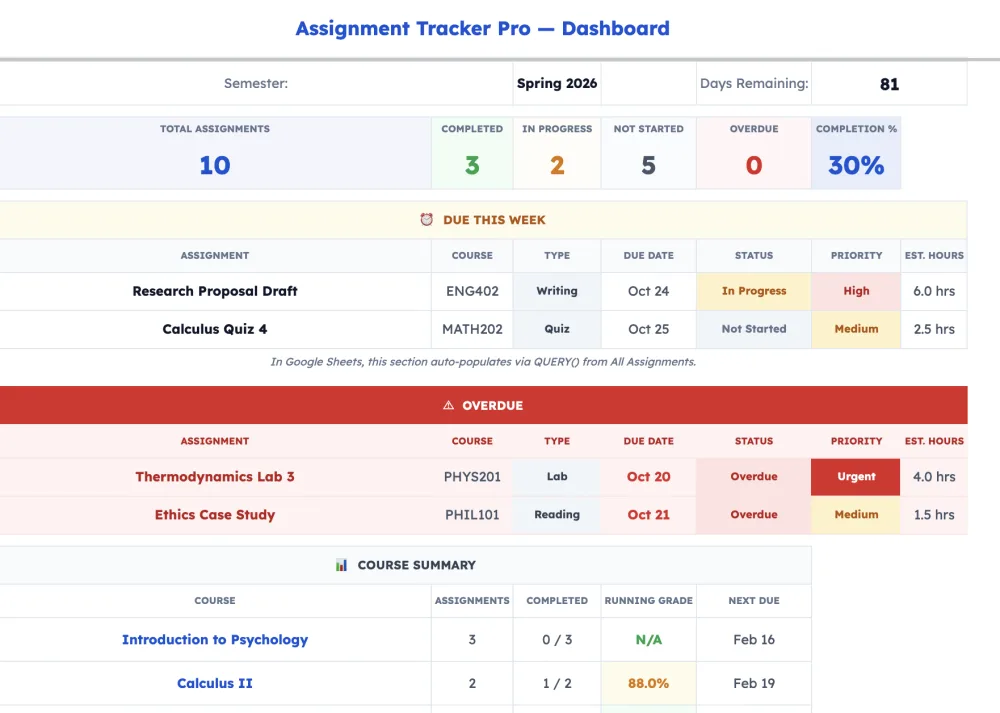
A purpose-built homework tracker template for Google Sheets (or Excel) comes pre-configured for student use. You enter your courses once during a 10-minute setup. Everything else — sorting, dashboards, grade calculations — is already built. No new app to learn. No blank page problem. Instead of doing my assignment tracker setup for hours, you're tracking assignments in university or college within minutes.
Pros
10-minute setup. Enter your courses, add your assignments, done.
Dashboard across all courses. Every deadline across all courses, one place — without building anything.
Grade calculator with projections. Not just what you've earned: what do I need on the final to hit my target grade? That question is answered automatically.
Do Date engine. Instead of just showing when something is due, a well-built tracker tells you when to start — factoring in assignment weight and lead time. You know exactly when to start on every piece of work.
Automated sorting and archiving. Completed assignments move out of your way. Upcoming work surfaces automatically.
Works in both Google Sheets and Excel. No Google account? Use the Excel version. No new software.
Shareable. Send a view-only link to a study partner or academic advisor.
Cons
Quality templates cost money — typically $5–10 as a one-time payment. The view is table-based, not kanban or calendar. The Google Sheets version requires a Google account. No built-in push notifications (pair with Google Calendar for due date reminders).
Best For
Students taking four to six courses who want to be organised immediately. Anyone who has tried other methods and abandoned them within a month. Students who care about their grades, not just their deadlines.
Our Recommendation: Assignment Tracker Pro
Assignment Tracker Pro is built specifically for this. The full version is an 8-tab system: Dashboard, All Assignments, Weekly Planner, Grade Calculator, individual Course tabs, and Settings. The Do Date engine is the feature most students say they didn't know they needed — it calculates backwards from the due date to tell you when to start, based on the assignment's weight and your personal lead-time preference.
The "What Do I Need?" grade projection answers the question every student asks before finals. You enter your target grade; the calculator tells you the exact score you need on remaining assessments to hit it.

Apps Script automation handles sorting and archiving so you're never manually managing rows.
If you've already read about the best assignment tracker templates, you've seen how this compares to the field.
Comparison Table: All 5 Methods at a Glance
| Feature | Paper Planner | Phone App | Notion / Trello | DIY Spreadsheet | Tracker Template |
|---|---|---|---|---|---|
| Setup time | 5 min | 10 min | 2–4 hours | 1–2 hours | 10 min |
| Grade tracking | ✗ | ✗ | Manual | Manual | ✓ Auto |
| Grade projection | ✗ | ✗ | ✗ | ✗ | ✓ |
| Multi-course dashboard | ✗ | ✗ | If built | ✗ | ✓ |
| Do Dates (when to start) | ✗ | ✗ | ✗ | ✗ | ✓ |
| Push reminders | ✗ | ✓ | ✓ | ✗ | ✗* |
| Offline access | ✓ | ✓ | Limited | ✓ | ✓ |
| Cost | $5–15 | Free | Free | Free | $0–10 |
| Learning curve | None | Low | High | Medium | None |
*Pair with Google Calendar for due date reminders.
The Verdict
If you're reading this article, you've probably already tried at least one method that didn't stick.
That's not a discipline problem. It's a friction problem. Students start the semester with real intentions — the new planner, the Notion setup, the colour-coded spreadsheet — and abandon it within two to three weeks when the system requires more maintenance than it saves. Instead of doing my assignment on time, you're debugging your system.
The best system is the one you'll actually open every day. A dedicated homework tracker with a 10-minute setup eliminates the biggest barrier: getting started. Once your courses are entered and your first batch of assignments is in, the tracker does the heavy lifting. You're not managing a system. You're just checking what's next. Every time you sit down to work on assignments, the dashboard tells you exactly where to focus.
Pair it with a class schedule template to get full visibility across your week, and you'll head into every Monday knowing exactly what's coming.
Or download the free assignment tracker template to start with no commitment.
Frequently Asked Questions
Can I combine methods?
Yes. Many students use a phone app for reminders and a spreadsheet or template for the big picture. The tracker template handles both deadline visibility (conditional formatting highlights urgent work) and grade tracking, so you may find one tool covers both needs.
I'm a graduate student. Do these methods still work?
Yes, though graduate students often need to track research milestones and thesis progress alongside coursework. Assignment Tracker Pro's Notes column and flexible assignment types handle thesis milestones alongside regular coursework. The grade projection features are equally useful for graduate seminars with weighted assessments.
What about my university's LMS — Canvas, Blackboard, Moodle?
Your LMS tracks what you've submitted and stores your grades. It doesn't calculate your projected final grade, suggest when to start working on something, or give you a cross-course dashboard that shows everything at once. Use both. They serve different purposes.
How often should I update my tracker?
A daily check takes about 30 seconds — the Dashboard shows what needs attention immediately. Add new assignments weekly, ideally when your syllabus gets updated or when a professor announces something new. The habit is small enough to actually stick.
Can I use ChatGPT to do my homework?
ChatGPT can help you understand concepts, brainstorm ideas, and check your reasoning — but it can't submit work for you, and most universities have clear policies on AI-generated submissions. Where AI genuinely helps is with organisation: summarising readings, breaking large assignments into steps, or drafting study plans. But it won't track your deadlines, calculate your grades, or tell you which assignments in university need attention this week. A homework tracker handles the management side so you can focus on the actual work.
Does this advice work for assignments in university outside the US?
Yes. The methods are the same whether you're at a US college, a UK university, or anywhere else with coursework-based assessment. Assignment Tracker Pro uses flexible grading (percentage and points-based) and supports any term structure — semesters, trimesters, or year-long courses.
Ready to get organised?
Get the Free Assignment Tracker TemplateHave your semester mapped out before your next class.